


Recently, I have written some blog posts to share ways in which I have made the funds in my wallet go a bit further. My methods were nothing fancy. But a fascination with deals has helped me build quite an engaging community area in our schools. Teachers can come have some coffee and light refreshments. Together we can discuss ways to integrate technology into our daily teaching. Students can come to explore learning passions tied to curriculum. All of these from just thinking outside-the-box regarding an underused area of our school. One small idea that I had has benefited several from our building. Along the way, my efforts have also benefited a non-profit that helps students in Pennsylvania. Here is another such tip:
Tip - Share through Smile.amazon.com
As teachers, so many of us sacrifice and purchase items to make our students and schools have what they need. If you know you are going to purchase items to bring to your makerspace/classroom, why not have 10% of your spending benefit the charity of your choice. My purchases have been supporting The Purple Feet Foundation but many organizations are participating (including many PTA's). Your kindness supplying items for your makerspace/classroom can have double the rewards. Gift your makerspace with items and gift the charity of your choice with a percentage of the value of your purchase. Financially, it costs you nothing. You just need to remember to visit the correct website - smile.amazon.com instead of going through the main home page.
Monday, May 4, 2015

Monday, April 13, 2015
Tip - Cleanup with Clearance
Perhaps you viewed my previous posts on ways to stretch your limited dollars when creating a makerspace. Here is another tip in the series:
Food Store Clearnce Aisles - Most food stores have an area designated for slightly damaged or nearly expired items. You can really cleanup on items for your makerspace/classroom here. I recently found a $20 wipe board on a clearance for $2.50. Now there is a math problem I enjoy. Saving $18.50 - hmmm what else could I purchase with that money? Have you noticed boxes of spaghetti that might not be the first to sell due to the status of the carboard? Couldn't they still be used to make tower structures or bridges? Day-old bakery items (like brownies and cookies) still make a special treat for staff. Just consume them that day or the next. But what a bargain when priced at around $1 to $3.
Food Store Clearnce Aisles - Most food stores have an area designated for slightly damaged or nearly expired items. You can really cleanup on items for your makerspace/classroom here. I recently found a $20 wipe board on a clearance for $2.50. Now there is a math problem I enjoy. Saving $18.50 - hmmm what else could I purchase with that money? Have you noticed boxes of spaghetti that might not be the first to sell due to the status of the carboard? Couldn't they still be used to make tower structures or bridges? Day-old bakery items (like brownies and cookies) still make a special treat for staff. Just consume them that day or the next. But what a bargain when priced at around $1 to $3.
Tuesday, April 7, 2015
Tip - Depending on "Dollar Deals"
Hopefully you have seen my previous posts regarding making Makerspaces realities:
Discovery Education iMake iLearn Blog
Personal blog continuation
Here is yet another tip to consider if you are in the process of developing a Makerspace in your educational space. #OurSTEAMCafe has come about without much in the way of a budget. I've been making magic from my wallet.
Tip - Depending on "Dollar Deals"
Stop and Shop (Food Store) Dollar Deal Bins - Most food stores have either an area or a bin that changes periodically with items on sale or at deeply discounted prices. My local food store labels the boxes “Dollar Deals” and some boxes are $1 items, $2 items or $3 items. Of course I visit the $1 box first! You never know what you will find. But those small items necessary for a makerspace can be gathered quickly and inexpensively here. Depending on the week, you might find varying sized mini-chalkboards, containers, pot cloths, soaps, q-tips, tongue depressers, cups, wipes, sponges and more can be found. Those small bulk items likes straws and cups can be purchased in great quantity for much less than purchasing them in the average aisles on an average day. May I suggest visiting these bins frequently as they constantly change.
These past few tips I've shared are merely a few of the things I have discovered along my way. I would love to hear/learn about your discoveries. How are you bringing your Makerspace dreams to life?
Monday, March 30, 2015
Tip - Pharmacies, More than Just Bandages
You may have seen my March 25th DEN Blog Post. I shared 5 ways to help bring a makerspace into reality in your school community. In creating a makerspace/shared community learning center, I have found it necessary to think-outside-the-box. I had to ponder ways to make small steps towards reaching my goal. Here is another idea of such a small step.
Tip - Pharmacies, More than Just Bandages
Of course, having a first-aid kit available is an important small proactive step in creating any makerspace. But your local pharmacy may offer even more opportunities for making your dreams a reality.
Many of the larger chain pharmacies these days offer loyalty rewards programs. You can sign up with your email to receive discounts. Check your email periodically. Additional coupon savings become available to electronically send to your loyalty program cards.
The everyday items you need (mouthwash, socks, candy, makeup, etc), earn money back and coupons you can receive. Also don’t overlook the specific manufacturer coupons. Buy 1 specific brand battery package and get the 2nd free or half price can help keep the gadgets in your room running.

Last week, I had $4 in rewards to spend. Have you ever noticed that even though these pharmacy locations are usually chains, several carry different items? Keep your eye out for when is the perfect time to actually cash in those rewards. Would it be better to save 20% on an inexpensive bag of cotton balls or 20% on markers? With my $4 rewards I purchased clay, chalkboard labels, and clips for adding to #OurSTEAMCafe supplies.
 The next day at another store of the same chain I nocited a sale. Work the weekly sales that are offered. These activity buckets were on sale as buy one get one 50% off. They certainly helped me gather quite a few assorted supplies inexpensively. Wish I had saved my $4 off for this purchase. But we teachers go above and beyond so my students and staff now have access to the supplies shown in both photos.
I'll have more suggestions to share from my own endeavor soon. But in the meantime, I'd love to hear how you are maximizing your dollars and making your makerspace dreams come true.
Friday, February 6, 2015
Picking up STEAM
So #OurSTEAMCafe has had a little bit of a pause. The space was needed temporarily to provide an accommodation for a much needed building situation. But soon that project will be complete and my S.T.E.A.M. Cafe project will be up in full swing. Looking forward to "picking up STEAM". More and more teachers have been discovering the community space feel that I tried to create. Several have started contributing: sharing ideas, some accessories for coffee and tea, ideas for inexpensive instructional tools, and better supplies. Love this team experience.
 Today a district provided math professional development took place in the space. I loved hearing teachers comment about the change in the physical space. And now I so look forward to hopefully creating a change in perception and use. Perception and eye's-view can make all the difference. A little out of the box thinking can perk us up and brew up some great ideas.
During today's math professional development the lead brought in one of those wonderful Dunkin Donut's Box of Joe's. (Love those) Unfortunately, today's box didn't seem to want to pour as is. While I was preoccupied with something else, someone opened the box. Did you know the box is designed with overlapping cardboard flaps?! I didn't. In the past I have just seen it as all one piece - a Box of Joe.
 But on closer inspection, the box is rather uniquely designed. Underneath the overlapping pieces of cardboard is a metalic pouch that holds the warm coffee. Since the usual tipping action wasn't working to get coffee from the pouch, the teachers applied a little "out-of-the-box" thinking. A squeezing action applied to the pouch would force the coffee out of the pouch through the spout and into their waiting coffee cups. How creative and awe inspiring for me. I had to snap a picture of the inner workings. The PD lead let me keep the remaining coffee for anyone else that might like some that afternoon. You can believe before I went home this afternoon, I cleaned out that pouch and labelled it "Keep for Engineering" with a sharpie. Do NOT throw that away. Now THAT's STEAM Ed! What a great discussion about insulation, heat, force, airflow and more do I see in our future! How are you thinking "outside-the-box"? What have you discovered lately?
Since a few months now have gone by, it was time to take stock of the items in #OurSTEAMCafe. Time to see what needs to be renewed, dusted, revamped, replaced, or replenished. So as I dusted and reorganized I snapped a few pictures of the centers I go to reorganize this week. More centers to get refreshed (still had to complete my Instructional Technology Facilitator role) soon. But here are a few photos of the S-T-and M areas.
Today a district provided math professional development took place in the space. I loved hearing teachers comment about the change in the physical space. And now I so look forward to hopefully creating a change in perception and use. Perception and eye's-view can make all the difference. A little out of the box thinking can perk us up and brew up some great ideas.During today's math professional development the lead brought in one of those wonderful Dunkin Donut's Box of Joe's. (Love those) Unfortunately, today's box didn't seem to want to pour as is. While I was preoccupied with something else, someone opened the box. Did you know the box is designed with overlapping cardboard flaps?! I didn't. In the past I have just seen it as all one piece - a Box of Joe.
But on closer inspection, the box is rather uniquely designed. Underneath the overlapping pieces of cardboard is a metalic pouch that holds the warm coffee. Since the usual tipping action wasn't working to get coffee from the pouch, the teachers applied a little "out-of-the-box" thinking. A squeezing action applied to the pouch would force the coffee out of the pouch through the spout and into their waiting coffee cups. How creative and awe inspiring for me. I had to snap a picture of the inner workings. The PD lead let me keep the remaining coffee for anyone else that might like some that afternoon. You can believe before I went home this afternoon, I cleaned out that pouch and labelled it "Keep for Engineering" with a sharpie. Do NOT throw that away. Now THAT's STEAM Ed! What a great discussion about insulation, heat, force, airflow and more do I see in our future! How are you thinking "outside-the-box"? What have you discovered lately?Since a few months now have gone by, it was time to take stock of the items in #OurSTEAMCafe. Time to see what needs to be renewed, dusted, revamped, replaced, or replenished. So as I dusted and reorganized I snapped a few pictures of the centers I go to reorganize this week. More centers to get refreshed (still had to complete my Instructional Technology Facilitator role) soon. But here are a few photos of the S-T-and M areas.
 |
| Science Area |
 |
| Technology Area (Left) |
 |
| Technology Area (Right) |
 |
| Math Area |
Monday, January 19, 2015
Hour of Code Party 2014
As promised here are some photos from our Hour of Code Kickoff Celebration for staff:


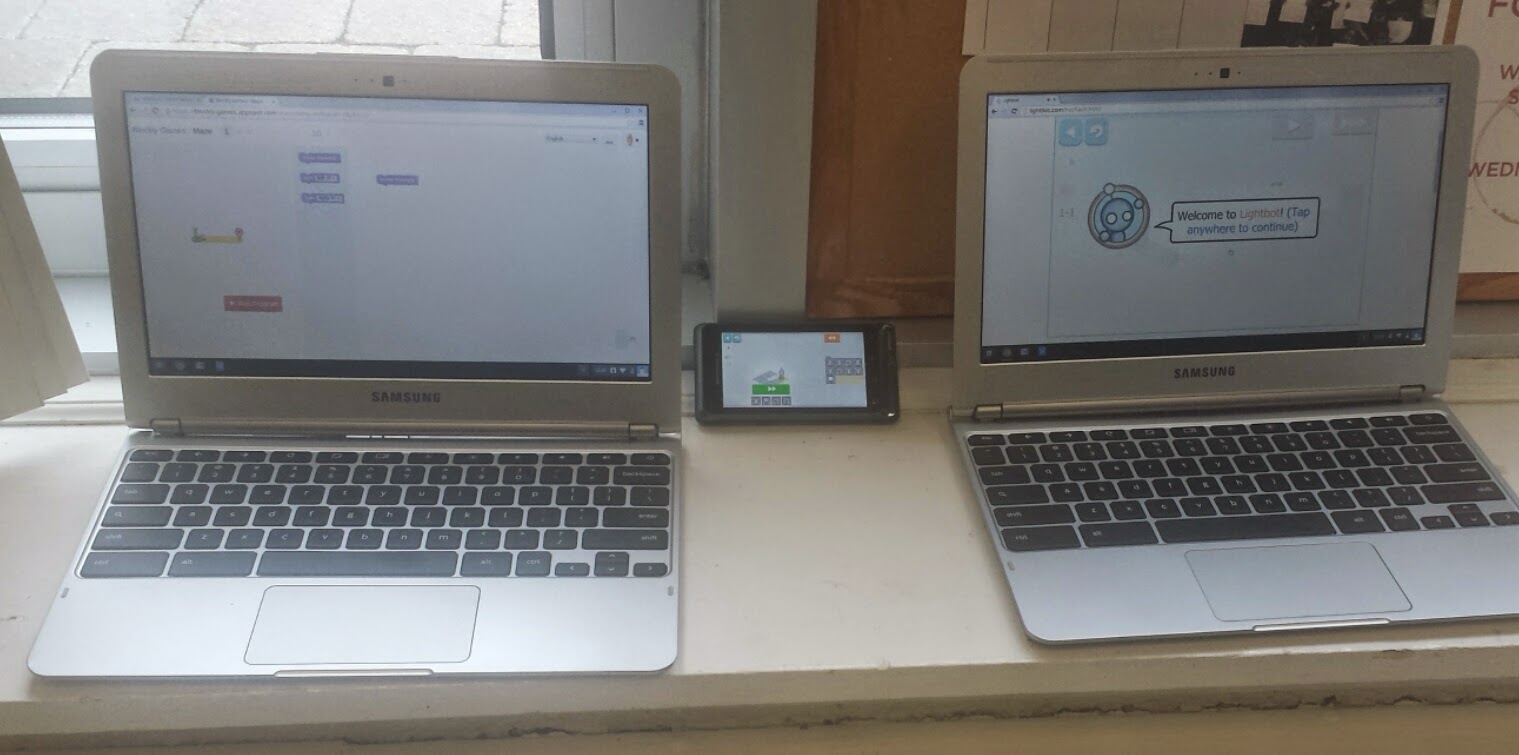


During the week of December 8 through the 14th all classes at school participated in The Hour of Code during their scheduled computer times. Students had an opportunity to explore http://code.org, http://blockly-games.appspot.com, and/or http://lightbot.com/hocflash.html.
I love that students are still asking if they can use Blockly when they come to the computer lab. I'd say that was a successful implementation.
How did your school (or class) celebrate Computer Science Education Week and The Hour of Code?
Saturday, December 6, 2014
Hour of Code is Coming
December 8th through the 15th is designated as Computer Science Education Week. Code.org is spirting an initiative to challenge 10 million students to give computer programming a try. It is called The Hour of Code So many resources are available at:
- hour of code -
- Code -
I am preparing a kickoff party for Monday to help teachers begin to think about ways to celebrate The Hour of Code in their individual classrooms. This should be so much fun. I will have photos of our event soon. But I wanted to share something that I created. I used the only software found at Avery.com to create business cards with commands on them. A class could use these to "program" each other or their teacher. Shuffle the cards. Choose one. Follow the command. You have created a program. It might be fun to create attribute cards too. Like numbers. How many steps forward or how many steps backward? But for now, this is what I created. Thought I might share. FYI, the robot clipart is available inside the Avery.com software. Thrilled with that. I decided to go with a Robot theme for our celebration. Our students will have an opportunity to try several online and offline resources. I can't wait to see their comments.
I'd love to know what you think of the file. Will it be useful to you?
Subscribe to:
Posts (Atom)